A Claude Code SSH screenshot uploader moves a laptop image to the server and gives you a path Claude Code can read. For one saved image, start with scp. Use an automatic uploader if every new screenshot should reach the server, or vmup if several images and files belong in one temporary agent folder.
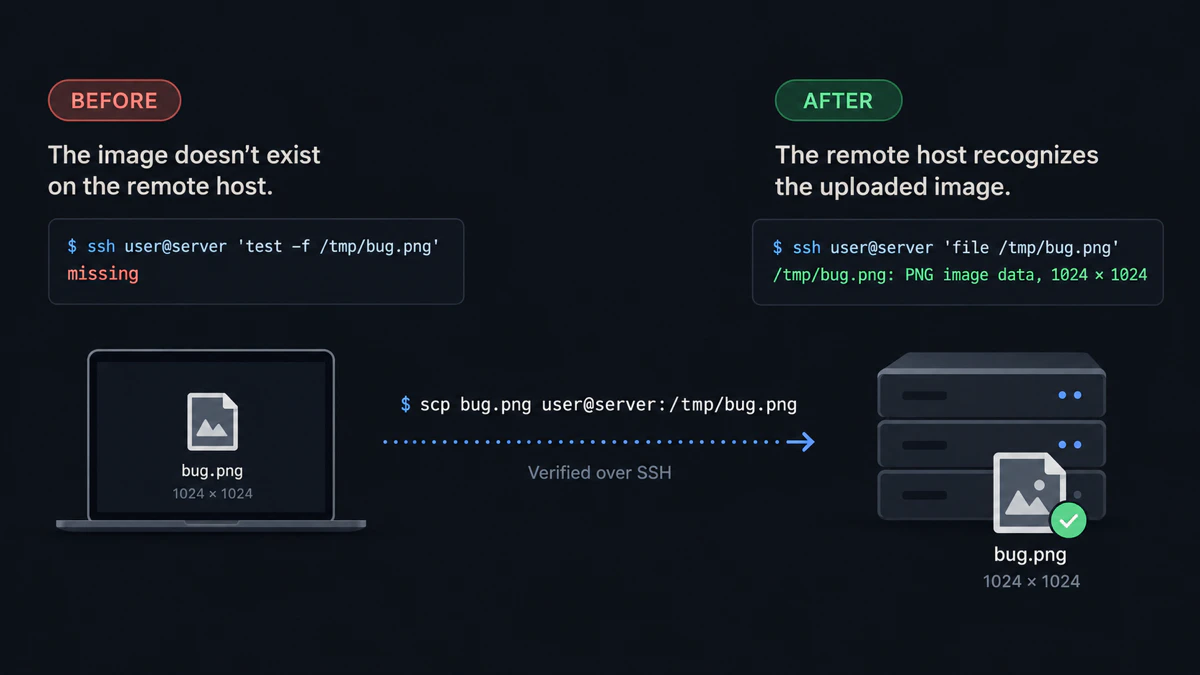
The control case used for this comparison is a real OpenSSH transfer: the remote path is absent before upload and readable afterward.
Start with the manual scp baseline
Before installing a clipboard tool, verify the workflow with scp:
scp bug.png user@server:/tmp/bug.pngExpected result: /tmp/bug.png exists on the host where Claude Code runs.
Inspect /tmp/bug.png.Expected result: Claude Code receives a server-side path and does not need access to the laptop clipboard.
If that is enough, stop here. If the repetition is the problem, compare the uploaders below. For a batch, install vmup and complete the first SSH upload.
Claude Code SSH screenshot uploader comparison
On a narrow screen, swipe the table to see each tool's best fit and trade-off.
| Tool | Design | Remote changes | Best fit | Main trade-off |
|---|---|---|---|---|
scp | Manual file copy | None beyond the uploaded file | One named file | You type every source and remote path |
| clipaste | Local clipboard daemon, SSH forwarding and remote helper | Installs helpers and SSH configuration | Frequent Claude Code screenshot paste | More moving parts; Codex uses a printed-path helper |
| cssh | Clipboard sync plus remote xclip shim | Installs a shim; optional Xvfb for Codex | Native-feeling Claude Code paste | Modifies remote PATH and may run a daemon |
| clipssh | Reads local clipboard, uploads a PNG, copies the remote path | Uploaded file only | One screenshot with no remote daemon | Screenshot-focused; /tmp cleanup is your job |
| PasteHop | Uploads a clipboard image or file and inserts/copies its remote path | Uploaded file; optional terminal integration | WezTerm or Kitty users who want a paste hook | Requires host trust and terminal integration for native paste |
| imgssh | Wraps SSH; Ctrl+] uploads a clipboard PNG and inserts its path | Uploaded file only | One image while working inside its SSH session | You must connect through the wrapper; PNG only |
| Paste2SSH | Mac menu bar app watches copied images, uploads them and copies remote paths | Uploaded file only | Automatic clipboard screenshot upload on macOS | Every copied image uploads while paste mode is on |
| Claude Screenshot Uploader | Mac screenshot-folder watcher uploads with rsync and copies remote paths | Uploaded file only | Automatic upload of newly saved screenshots | Requires a configured watched folder and background helper |
| vmup | Batches paths, clipboard items or watched files into one remote folder | Uploaded batch plus TTL cleanup | Several images or mixed file types | Produces a folder prompt, not a native image pill |
Every tool row links to its project documentation. Check it before installation because flags, supported platforms and cleanup behavior can change.
Automatic upload, paste shims or a path on demand?
Clipboard shims try to preserve Ctrl+V by making the remote clipboard look populated. clipaste and cssh fit this category. They are closest to local Claude Code, but they may alter SSH configuration, install a remote command or keep a background process alive.
Automatic uploaders watch for a new clipboard image or saved screenshot. Paste2SSH watches copied images; Claude Screenshot Uploader watches a screenshot folder. They send each image to the selected server in the background and put its remote path on your clipboard. Choose the trigger you actually use, and check where each tool stores and cleans up remote files.
On-demand path uploaders wait for a command or keypress. clipssh, PasteHop and imgssh transfer an image and provide the resulting remote path. They make the upload deliberate, and you can verify the file with ls or file on the server.
With a path uploader, Claude Code receives a readable remote path. With a clipboard shim, the remote session receives image data through the shim's paste flow.
Where vmup differs
vmup bug.png console.png notes.pdfExpected result: one Agent folder: path contains the whole set, and the generated prompt asks the agent to inspect that folder.
vmup does not aim to recreate [Image #1] inside Claude Code. It is for several files, mixed formats, one remote directory and automatic expiry. vmup watch stages files added to a chosen folder while it runs in the foreground; press Enter to upload the batch. It does not upload each new screenshot automatically in the background.
How to choose
- One saved PNG and no new dependency:
scp. - One clipboard screenshot and a remote path is acceptable: clipssh or PasteHop.
- Every copied image should upload from a Mac: Paste2SSH. For screenshots saved to a watched folder, consider Claude Screenshot Uploader.
- Native-feeling Claude Code paste is worth a daemon or remote shim: clipaste or cssh.
- One-session SSH wrapper and a keyboard trigger: imgssh.
- Several files or mixed formats: vmup.
For the complete manual workflow, read paste an image into Claude Code over SSH. If the TUI prints an error, read fix “No image found in clipboard”.
Last tested with
- Control transfer: macOS 26.6, OpenSSH 10.3p1, localhost SSH target, September 16, 2026
- Linux control transfer: Ubuntu 26.04, OpenSSH 10.2p1, Lima VM to localhost SSH target
- Batch workflow: vmup 0.4.0
- Comparison claims: checked against each linked project README or product page on September 24, 2026; third-party tools were not installed for this article
Quick answers
What is the simplest way to give Claude Code a screenshot over SSH?
Save the PNG, copy it with scp, and paste the remote path into Claude Code.
Which tools avoid a remote clipboard daemon?
scp, clipssh, PasteHop, imgssh, Paste2SSH, Claude Screenshot Uploader and vmup upload files without requiring a persistent remote clipboard daemon. Some run a local background app or watcher.
Which options handle files beyond screenshots?
scp, PasteHop, Paste2SSH and vmup accept explicit files. Confirm each tool’s current type restrictions before depending on it.
Does vmup watch upload each screenshot automatically? No. It stages new files in the watched folder, then uploads them together when you press Enter.
When should I use a clipboard shim? Use one when preserving the paste gesture matters more than minimizing remote setup and background processes.
When should I use a batch folder? Use a batch when several screenshots, documents or recordings belong to one agent request and one directory prompt is easier than listing every path.
Disclosure: vmup is maintained by the author of this article. The comparison keeps scp first so you can solve the problem without installing vmup or another helper.